

Overview
After receiving a session token from the handshake endpoint, you’ll embed Sticker into your application using an HTML iframe. This guide covers implementation, customization, and best practices.Basic iframe Implementation
Use theiframe_embed_url returned from the handshake endpoint:
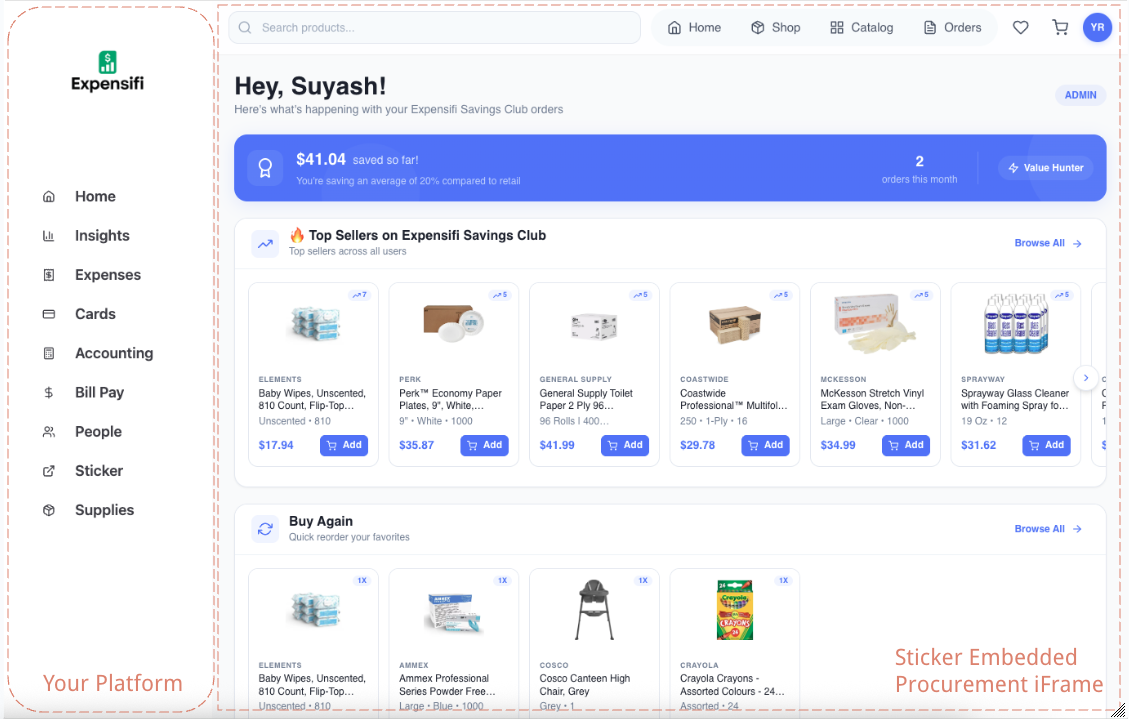
The Sticker embedded experience inside a partner application
Production iframe Code
Here’s the exact iframe configuration we use in production integrations:Feel free to play around with these attributes for your platform. The sandbox and allow attributes above are the recommended minimum for full functionality.
iframe Attributes Explained
Required Attributes
string
required
The iframe embed URL returned from the handshake endpoint, or constructed manually:
string
required
Security sandbox flags. Recommended configuration:
string
required
Feature policy permissions:
Recommended Attributes
string
Accessibility label for screen readers:
Style the iframe to fill your container:
URL Structure
The iframe URL follows this structure:Complete Integration Examples
React / Next.js
Vue.js
Vanilla HTML/JavaScript
Responsive Design
Full-Height Container
Make the iframe fill the available space:Constrained Width with Centered Content
For a more focused experience on wide screens:Mobile Optimization
Security Considerations
Sandbox Attribute
Sandbox Attribute
The sandbox attribute restricts what the iframe can do. Our recommended configuration:Do NOT add:
allow-top-navigation(allows iframe to navigate parent)allow-modals(unnecessary)
Content Security Policy
Content Security Policy
Add Sticker domains to your CSP if you have one:
HTTPS Required
HTTPS Required
Both your site and the iframe must use HTTPS. Mixed content (HTTP page with HTTPS iframe) will be blocked.
What the Embedded Experience Includes
The embedded experience includes:- Product Browsing - Search, filter, and browse products by category
- Shopping Cart - Add items, adjust quantities, remove items
- Multiple Shipping Locations - Select from org’s saved shipping addresses
- Checkout - Apply coupons, select payment method, place orders
- Order History - View past orders and their status
- Profile Management - View account details and favorites
Troubleshooting
iframe Shows Blank/White Screen
iframe Shows Blank/White Screen
Possible causes:
- Session token expired (>5 minutes old)
- Session token already used
- Invalid partner ID in URL
- Generate a fresh session token
- Verify the
iframe_embed_urlfrom handshake is correct - Check browser console for errors
iframe Shows Authentication Error
iframe Shows Authentication Error
Cause: Invalid session token or user not foundSolutions:
- Ensure organization setup was completed first
- Generate a new session token
- Verify the
internal_user_idmatches what was used in setup
Payment Not Working
Payment Not Working
Cause: Missing iframe permissionsSolution: Ensure you have:
iframe Blocked by Browser
iframe Blocked by Browser
Cause: Content Security Policy blocking frameSolution: Add to your CSP:
Scrolling Issues on Mobile
Scrolling Issues on Mobile
Cause: Container height not set properlySolution: Ensure parent container has explicit height:
Best Practices
Generate Tokens On-Demand
Only generate session tokens when the user clicks to open supplies, not in advance
Show Loading States
Display a loading indicator while authenticating and loading the iframe
Handle Errors Gracefully
Show user-friendly error messages with retry options
Test on Mobile
Ensure the experience works well on phones and tablets
Use Full Height
Make the iframe fill available space for the best UX
Fresh Tokens for Each Session
Generate a new token every time the user navigates to supplies
Next Steps
Best Practices
Advanced integration patterns and tips
Security
Security considerations for your integration