> ## Documentation Index
> Fetch the complete documentation index at: https://embed.usesticker.com/llms.txt
> Use this file to discover all available pages before exploring further.

# iframe Embedding

> Displaying Sticker in your application with the iframe element

## Overview

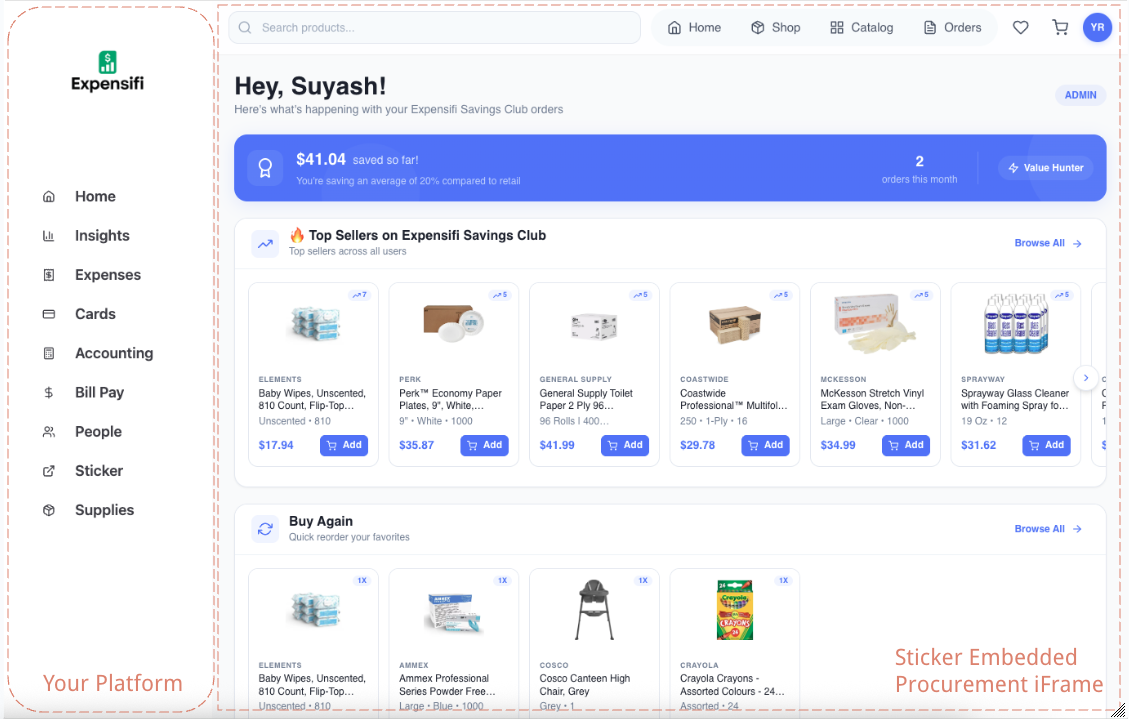
After receiving a session token from the handshake endpoint, you'll embed Sticker into your application using an HTML iframe. This guide covers implementation, customization, and best practices.

## Basic iframe Implementation

Use the `iframe_embed_url` returned from the handshake endpoint:

```html theme={null}
<iframe
  src="https://shop.usesticker.com/embedded/{partner_id}?session_key={token}"
  class="w-full h-full border-0"
  title="Sticker Embedded Procurement"
  sandbox="allow-same-origin allow-scripts allow-forms allow-popups allow-popups-to-escape-sandbox allow-top-navigation-by-user-activation"
  allow="payment; publickey-credentials-get; fullscreen"
></iframe>
```

<Frame caption="The Sticker embedded experience inside a partner application">
  <img src="https://mintcdn.com/sticker-c03065e9/AHQeizjEYq3MUqKR/sticker-embed-demo.png?fit=max&auto=format&n=AHQeizjEYq3MUqKR&q=85&s=3de4d4da56eec8ed01712c1a9bcf1b75" alt="Embedded Sticker Experience" width="1129" height="719" data-path="sticker-embed-demo.png" />
</Frame>

## Production iframe Code

Here's the exact iframe configuration we use in production integrations:

```jsx theme={null}
<iframe
  src={iframeLink}
  className="w-full h-full border-0"
  title="Sticker Embedded Procurement"
  sandbox="allow-same-origin allow-scripts allow-forms allow-popups allow-popups-to-escape-sandbox allow-top-navigation-by-user-activation"
  allow="payment; publickey-credentials-get; fullscreen"
/>
```

<Info>
  Feel free to play around with these attributes for your platform. The sandbox and allow attributes above are the recommended minimum for full functionality.
</Info>

## iframe Attributes Explained

### Required Attributes

<ParamField path="src" type="string" required>
  The iframe embed URL returned from the handshake endpoint, or constructed manually:

  ```
  https://shop.usesticker.com/embedded/{partner_id}?session_key={token}
  ```
</ParamField>

<ParamField path="sandbox" type="string" required>
  Security sandbox flags. Recommended configuration:

  | Flag                                      | Purpose                                 |
  | ----------------------------------------- | --------------------------------------- |
  | `allow-same-origin`                       | Required for local storage and cookies  |
  | `allow-scripts`                           | Required for app functionality          |
  | `allow-forms`                             | Required for search and checkout forms  |
  | `allow-popups`                            | Required for payment processing windows |
  | `allow-popups-to-escape-sandbox`          | Required for Stripe payment popups      |
  | `allow-top-navigation-by-user-activation` | Allows redirects after user interaction |
</ParamField>

<ParamField path="allow" type="string" required>
  Feature policy permissions:

  | Permission                  | Purpose                              |
  | --------------------------- | ------------------------------------ |
  | `payment`                   | Required for Stripe checkout         |
  | `publickey-credentials-get` | Enables WebAuthn for secure payments |
  | `fullscreen`                | Allows fullscreen mode if needed     |
</ParamField>

### Recommended Attributes

<ParamField path="title" type="string">
  Accessibility label for screen readers:

  ```
  title="Sticker Embedded Procurement"
  ```
</ParamField>

<ParamField path="className or style">
  Style the iframe to fill your container:

  ```html theme={null}
  class="w-full h-full border-0"
  <!-- or -->
  style="width: 100%; height: 100%; border: none;"
  ```
</ParamField>

## URL Structure

The iframe URL follows this structure:

```
https://shop.usesticker.com/embedded/{partner_id}?session_key={token}
```

| Part                     | Description                           |
| ------------------------ | ------------------------------------- |
| `shop.usesticker.com`    | Sticker's embedded shop domain        |
| `/embedded/{partner_id}` | Partner-specific route with your UUID |
| `?session_key={token}`   | Session token from handshake          |

<Warning>
  **Use the `iframe_embed_url` from handshake:** The handshake response includes a complete `iframe_embed_url` with your partner ID and session key already embedded. Use this directly instead of constructing the URL manually.
</Warning>

## Complete Integration Examples

### React / Next.js

```jsx theme={null}
import { useState, useEffect } from 'react';

function SuppliesModule({ userId }) {
  const [iframeUrl, setIframeUrl] = useState(null);
  const [loading, setLoading] = useState(true);
  const [error, setError] = useState(null);

  useEffect(() => {
    async function authenticate() {
      try {
        setLoading(true);
        setError(null);
        
        // Call YOUR backend to get session token
        const response = await fetch('/api/supplies/auth', {
          method: 'POST',
          headers: { 'Content-Type': 'application/json' },
          body: JSON.stringify({ userId })
        });
        
        if (!response.ok) {
          throw new Error('Authentication failed');
        }
        
        const data = await response.json();
        setIframeUrl(data.iframe_url);
      } catch (err) {
        setError(err.message);
      } finally {
        setLoading(false);
      }
    }
    
    authenticate();
  }, [userId]);

  if (loading) {
    return (
      <div className="flex items-center justify-center h-96">
        <div className="animate-spin rounded-full h-8 w-8 border-b-2 border-orange-500"></div>
        <span className="ml-2">Loading supplies...</span>
      </div>
    );
  }

  if (error) {
    return (
      <div className="flex flex-col items-center justify-center h-96">
        <p className="text-red-500 mb-4">Failed to load supplies: {error}</p>
        <button 
          onClick={() => window.location.reload()}
          className="px-4 py-2 bg-orange-500 text-white rounded hover:bg-orange-600"
        >
          Retry
        </button>
      </div>
    );
  }

  return (
    <iframe
      src={iframeUrl}
      className="w-full h-full border-0"
      title="Sticker Embedded Procurement"
      sandbox="allow-same-origin allow-scripts allow-forms allow-popups allow-popups-to-escape-sandbox allow-top-navigation-by-user-activation"
      allow="payment; publickey-credentials-get; fullscreen"
    />
  );
}

export default SuppliesModule;
```

### Vue.js

```vue theme={null}
<template>
  <div class="supplies-container">
    <!-- Loading State -->
    <div v-if="loading" class="loading-state">
      <div class="spinner"></div>
      <span>Loading supplies...</span>
    </div>
    
    <!-- Error State -->
    <div v-else-if="error" class="error-state">
      <p>Failed to load supplies: {{ error }}</p>
      <button @click="authenticate">Retry</button>
    </div>
    
    <!-- Embedded iframe -->
    <iframe
      v-else
      :src="iframeUrl"
      class="w-full h-full border-0"
      title="Sticker Embedded Procurement"
      sandbox="allow-same-origin allow-scripts allow-forms allow-popups allow-popups-to-escape-sandbox allow-top-navigation-by-user-activation"
      allow="payment; publickey-credentials-get; fullscreen"
    />
  </div>
</template>

<script>
export default {
  props: ['userId'],
  data() {
    return {
      iframeUrl: null,
      loading: true,
      error: null
    };
  },
  mounted() {
    this.authenticate();
  },
  methods: {
    async authenticate() {
      try {
        this.loading = true;
        this.error = null;
        
        const response = await fetch('/api/supplies/auth', {
          method: 'POST',
          headers: { 'Content-Type': 'application/json' },
          body: JSON.stringify({ userId: this.userId })
        });
        
        if (!response.ok) throw new Error('Authentication failed');
        
        const data = await response.json();
        this.iframeUrl = data.iframe_url;
      } catch (err) {
        this.error = err.message;
      } finally {
        this.loading = false;
      }
    }
  }
};
</script>

<style scoped>
.supplies-container {
  width: 100%;
  height: 100vh;
}

.loading-state, .error-state {
  display: flex;
  flex-direction: column;
  align-items: center;
  justify-content: center;
  height: 100%;
}
</style>
```

### Vanilla HTML/JavaScript

```html theme={null}
<!DOCTYPE html>
<html>
<head>
  <title>Supplies</title>
  <style>
    .supplies-container {
      width: 100%;
      height: 100vh;
      position: relative;
    }
    
    .supplies-container iframe {
      width: 100%;
      height: 100%;
      border: none;
    }
    
    .loading-overlay {
      position: absolute;
      top: 0;
      left: 0;
      right: 0;
      bottom: 0;
      display: flex;
      align-items: center;
      justify-content: center;
      background: #f5f5f5;
    }
    
    .hidden { display: none; }
  </style>
</head>
<body>
  <div id="supplies-container" class="supplies-container">
    <div id="loading" class="loading-overlay">
      Loading supplies...
    </div>
  </div>

  <script>
    async function loadSupplies(userId) {
      const container = document.getElementById('supplies-container');
      const loading = document.getElementById('loading');
      
      try {
        // Call your backend to get session token
        const response = await fetch('/api/supplies/auth', {
          method: 'POST',
          headers: { 'Content-Type': 'application/json' },
          body: JSON.stringify({ userId })
        });
        
        if (!response.ok) throw new Error('Authentication failed');
        
        const data = await response.json();
        
        // Create and append iframe
        const iframe = document.createElement('iframe');
        iframe.src = data.iframe_url;
        iframe.title = 'Sticker Embedded Procurement';
        iframe.sandbox = 'allow-same-origin allow-scripts allow-forms allow-popups allow-popups-to-escape-sandbox allow-top-navigation-by-user-activation';
        iframe.allow = 'payment; publickey-credentials-get; fullscreen';
        
        iframe.onload = () => {
          loading.classList.add('hidden');
        };
        
        container.appendChild(iframe);
        
      } catch (error) {
        loading.textContent = `Error: ${error.message}`;
      }
    }
    
    // Load supplies for current user
    loadSupplies('user-123');
  </script>
</body>
</html>
```

## Responsive Design

### Full-Height Container

Make the iframe fill the available space:

```css theme={null}
/* Parent container should have a defined height */
.supplies-page {
  height: calc(100vh - 64px); /* Subtract your header height */
}

.supplies-iframe {
  width: 100%;
  height: 100%;
  border: none;
}
```

### Constrained Width with Centered Content

For a more focused experience on wide screens:

```css theme={null}
.supplies-wrapper {
  width: 100%;
  max-width: 1400px;
  margin: 0 auto;
  height: calc(100vh - 64px);
  padding: 0 16px;
}

.supplies-iframe {
  width: 100%;
  height: 100%;
  border: none;
  border-radius: 8px;
  box-shadow: 0 2px 10px rgba(0, 0, 0, 0.1);
}
```

### Mobile Optimization

```css theme={null}
.supplies-container {
  width: 100%;
  height: 100vh;
  overflow: auto;
  -webkit-overflow-scrolling: touch; /* Smooth scrolling on iOS */
}

@media (max-width: 768px) {
  .supplies-container {
    padding: 0;
    /* Account for mobile browser chrome */
    height: calc(100vh - env(safe-area-inset-bottom));
  }
}
```

## Security Considerations

<AccordionGroup>
  <Accordion title="Sandbox Attribute" icon="shield">
    The sandbox attribute restricts what the iframe can do. Our recommended configuration:

    ```html theme={null}
    sandbox="allow-same-origin allow-scripts allow-forms allow-popups allow-popups-to-escape-sandbox allow-top-navigation-by-user-activation"
    ```

    **Do NOT add:**

    * `allow-top-navigation` (allows iframe to navigate parent)
    * `allow-modals` (unnecessary)
  </Accordion>

  <Accordion title="Content Security Policy" icon="file-shield">
    Add Sticker domains to your CSP if you have one:

    ```
    Content-Security-Policy: frame-src https://shop.usesticker.com https://*.usesticker.com;
    ```
  </Accordion>

  <Accordion title="HTTPS Required" icon="lock">
    Both your site and the iframe must use HTTPS. Mixed content (HTTP page with HTTPS iframe) will be blocked.
  </Accordion>
</AccordionGroup>

## What the Embedded Experience Includes

The embedded experience includes:

* **Product Browsing** - Search, filter, and browse products by category
* **Shopping Cart** - Add items, adjust quantities, remove items
* **Multiple Shipping Locations** - Select from org's saved shipping addresses
* **Checkout** - Apply coupons, select payment method, place orders
* **Order History** - View past orders and their status
* **Profile Management** - View account details and favorites

## Troubleshooting

<AccordionGroup>
  <Accordion title="iframe Shows Blank/White Screen">
    **Possible causes:**

    * Session token expired (>5 minutes old)
    * Session token already used
    * Invalid partner ID in URL

    **Solutions:**

    * Generate a fresh session token
    * Verify the `iframe_embed_url` from handshake is correct
    * Check browser console for errors
  </Accordion>

  <Accordion title="iframe Shows Authentication Error">
    **Cause:** Invalid session token or user not found

    **Solutions:**

    * Ensure organization setup was completed first
    * Generate a new session token
    * Verify the `internal_user_id` matches what was used in setup
  </Accordion>

  <Accordion title="Payment Not Working">
    **Cause:** Missing iframe permissions

    **Solution:** Ensure you have:

    ```html theme={null}
    sandbox="... allow-popups allow-popups-to-escape-sandbox ..."
    allow="payment; ..."
    ```
  </Accordion>

  <Accordion title="iframe Blocked by Browser">
    **Cause:** Content Security Policy blocking frame

    **Solution:** Add to your CSP:

    ```
    frame-src https://shop.usesticker.com https://*.usesticker.com;
    ```
  </Accordion>

  <Accordion title="Scrolling Issues on Mobile">
    **Cause:** Container height not set properly

    **Solution:** Ensure parent container has explicit height:

    ```css theme={null}
    .supplies-container {
      height: 100vh;
      overflow: auto;
      -webkit-overflow-scrolling: touch;
    }
    ```
  </Accordion>
</AccordionGroup>

## Best Practices

<CardGroup cols={2}>
  <Card title="Generate Tokens On-Demand" icon="bolt">
    Only generate session tokens when the user clicks to open supplies, not in advance
  </Card>

  <Card title="Show Loading States" icon="spinner">
    Display a loading indicator while authenticating and loading the iframe
  </Card>

  <Card title="Handle Errors Gracefully" icon="circle-exclamation">
    Show user-friendly error messages with retry options
  </Card>

  <Card title="Test on Mobile" icon="mobile">
    Ensure the experience works well on phones and tablets
  </Card>

  <Card title="Use Full Height" icon="arrows-up-down">
    Make the iframe fill available space for the best UX
  </Card>

  <Card title="Fresh Tokens for Each Session" icon="rotate">
    Generate a new token every time the user navigates to supplies
  </Card>
</CardGroup>

## Next Steps

<CardGroup cols={2}>
  <Card title="Best Practices" icon="lightbulb" href="/integration/best-practices">
    Advanced integration patterns and tips
  </Card>

  <Card title="Security" icon="shield" href="/advanced/security">
    Security considerations for your integration
  </Card>
</CardGroup>
